
Tailwind for Pinterest: Complete Scheduler Guide & Honest Review 2026
Tailwind for Pinterest: Complete Scheduler Guide & Honest Review 2026
If you've tried to use Pinterest for your business and felt like you're shouting into the void, this one's for you.
Pinterest has been called the secret weapon for small business marketing. And it's true. Unlike Instagram or Facebook where your posts disappear into the feed within hours, Pinterest content can drive traffic for months or even years.
But here's the catch: Pinterest only works if you're consistent. Really consistent. Like posting 10 to 20 times per day consistent.
And if you're running a business, raising a family, or just trying to have a life, manually posting on Pinterest that frequently is impossible. Which is why I use Tailwind to schedule everything.
This isn't a sponsored post. I pay for Tailwind myself. I'm sharing my affiliate link because if you decide to try it, I'll get a small commission at no cost to you. But mostly I'm writing this because I wish someone had explained how schedulers work when I first started using Pinterest.
So let's break down what Tailwind actually does, why it matters, and whether it's worth your time and money.
Why Pinterest Needs Scheduling (And Manual Posting Doesn't Cut It)
Pinterest isn't social media. It's a visual search engine. People go there looking for solutions to problems, ideas for projects, and products to buy.
And here's the part that makes Pinterest different from Instagram or Facebook: your pins keep working for you months or even years after you post them. Over 60% of saves on Pinterest come from pins that are over a year old.
That means one good pin can drive traffic to your website for years. But only if you're consistent enough for Pinterest's algorithm to take you seriously.
And that's where most people fail. Because consistent on Pinterest means pinning 10 to 20 times per day. Every day. At optimal times when your specific audience is most active.
Who has time for that? Nobody. Which is exactly why schedulers exist.
What Makes Tailwind Different From Other Pinterest Schedulers
Tailwind is Pinterest's oldest official partner. They've been doing this since 2012, which means they understand Pinterest better than basically anyone else.
And unlike some other scheduling tools that try to do everything for every platform, Tailwind was built specifically for Pinterest first. Every feature is designed around what actually works on Pinterest, not what works on Instagram or Facebook.
Here's what that means in practice: Tailwind's features are based on data from over a million pins. They know what drives engagement. They know when to post. They know how often to post. And they build all of that knowledge into the tool.
According to their own research, pins published through Tailwind perform 7% better on average than pins published manually. And pins through Tailwind are 54% more likely to go viral.
Those numbers matter when you're trying to drive actual traffic to your business.
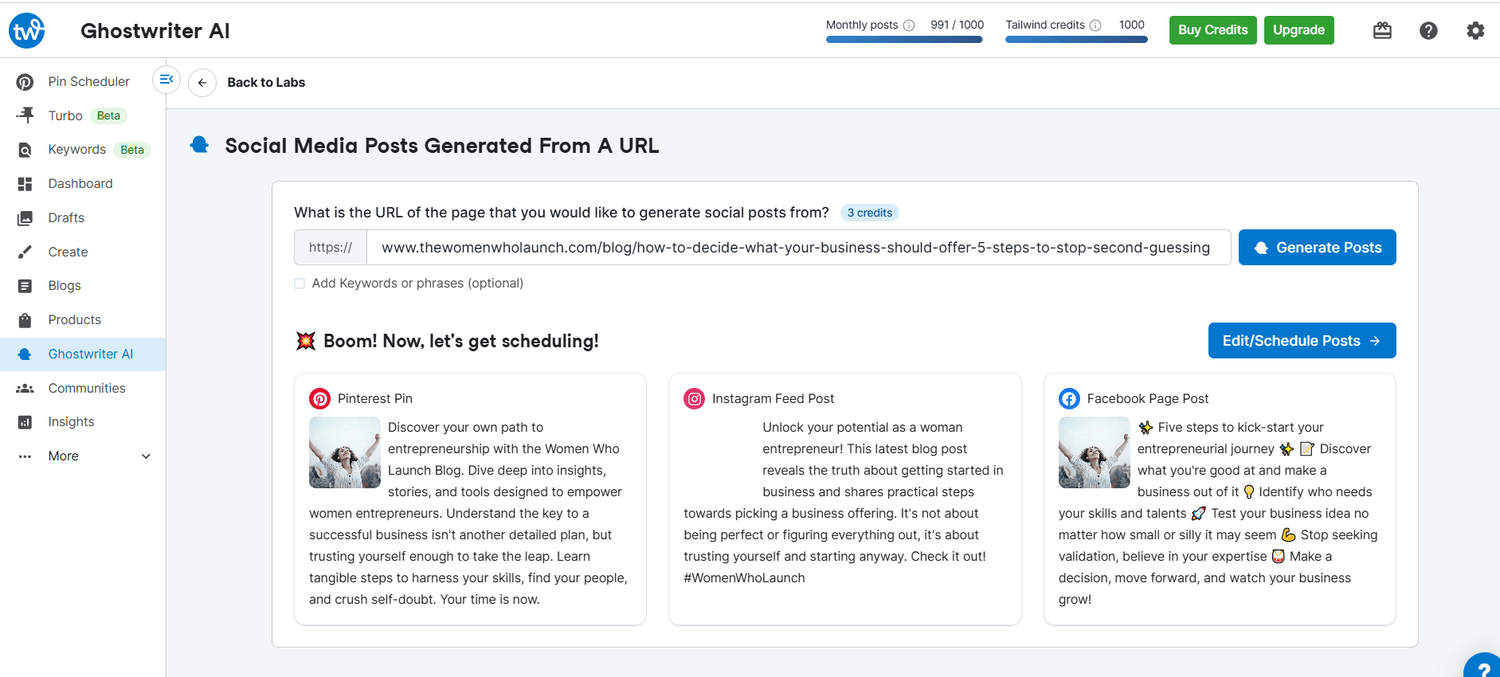
The Features That Actually Make a Difference
Let me walk you through the Tailwind features I use every week and why they've made Pinterest manageable instead of overwhelming.
SmartSchedule: Post When Your Audience Is Actually Paying Attention
The first time I used SmartSchedule, I realized I'd been posting at completely the wrong times.
SmartSchedule analyzes when your specific audience is most active and engaged. Not generic "best times to post on Pinterest." Your actual audience's behavior.
Then it creates a personalized posting schedule optimized for your account. You tell it how many times you want to post per day, and it handles the timing.
I set mine to 15 pins per day. Tailwind spaces them out at optimal times automatically. I never have to think about when to post. I just load up my pins and let SmartSchedule do its thing.
Bulk Scheduling: Create a Month of Content in One Sitting
This is the feature that saved me hours every single week.
Instead of creating and posting pins throughout the day, every day, I batch everything. One focused session where I create 30 to 50 pins, write all the descriptions, and schedule them all at once.
Then I'm done. For weeks.
Tailwind's drag and drop calendar makes this ridiculously easy. I can see my whole month at a glance. If I need to move something or adjust timing, I just drag it to a new slot.
The bulk editing feature is clutch here too. I can select multiple pins and update all their descriptions, boards, or URLs at once. No copying and pasting the same thing 30 times.
Browser Extension: Pin From Anywhere
The Tailwind Chrome extension is one of those things I didn't think I'd use much, and now I can't imagine working without it.
When I publish a new blog post, I don't have to download images and upload them to Tailwind. I just click the extension button while I'm looking at my post. It pulls the images, the title, the description, everything. I can schedule it right there without ever leaving the page.
Same thing when I'm browsing Pinterest for inspiration. See a pin format that's performing well? Click the extension, schedule a similar pin to test it.
It's fast. It's seamless. And it eliminates the friction that used to make me procrastinate on Pinterest.
Pin Spacing: Avoid Looking Spammy
Pinterest doesn't want you posting the same pin to multiple boards within hours of each other. It looks spammy and they'll ding your reach.
Tailwind's pin spacing feature automatically spaces out when your pin goes to different boards. So if you want to share one blog post pin to five relevant boards, Tailwind will spread those out over weeks or months based on best practices.
You don't have to track it manually. You don't have to worry about accidentally spamming. It just handles it.
Analytics That Actually Help
Pinterest's native analytics are fine, but Tailwind's are better for actually understanding what's working.
I can see which pins are driving the most repins, clicks, and engagement. Which boards perform best. Which posting times work. What types of content my audience responds to.
This isn't just data for data's sake. It tells me what to create more of and what to stop wasting time on.
Tailwind has a design feature called Tailwind Create that lets you design pins inside the platform. I'll be honest: I still prefer Canva for design. But if you're not already a Canva user or you want everything in one place, Tailwind Create is solid. It has templates, it applies your brand colors and fonts, and you can create multiple pin variations quickly.
For me, the value of Tailwind isn't in design tools. It's in scheduling and analytics. But if you need an all-in-one solution, Tailwind Create is a nice bonus.
How I Actually Use Tailwind in My Weekly Workflow
Let me show you what this looks like in practice because theory is one thing and real life is another.
Every Monday morning, I set aside 90 minutes for content batching. I open Canva, create five to ten pin designs for my recent blog posts or products, and export them all.
Then I open Tailwind, upload those pins, write descriptions for each one, and schedule them across my boards for the next two weeks.
I also use the browser extension throughout the week. When I publish a new blog post, I immediately schedule three pin variations for it. Takes maybe five minutes.
That's it. Ninety minutes on Monday plus a few minutes here and there during the week, and Pinterest runs itself. My pins go out consistently, at optimal times, without me having to log into Pinterest every single day.
Compare that to manual posting, where I'd be logging in multiple times per day, trying to remember which pins I'd already posted to which boards, and inevitably forgetting to post half the time because I got busy.
The difference in traffic is night and day. My Pinterest referral traffic went up over 200% in the first three months after I started using Tailwind consistently. Not because my pins were suddenly better. Just because I was finally showing up consistently enough for the algorithm to notice.
The Pricing Reality
Let's talk about cost because I know that's on your mind.
Tailwind has a free plan that's actually usable. You get limited scheduling, but it's enough to test the platform and see if it works for you.
The paid plans start around $15 per month if you pay annually. Monthly is more expensive but gives you flexibility.
Is it worth it? For me, absolutely. I was spending at least five to seven hours per week on Pinterest before Tailwind. Now I spend one. That's six hours back in my week, every week.
If your time is worth anything, the tool pays for itself immediately. Plus the traffic it drives to my blog and business is worth way more than $15 monthly.
But you don't have to take my word for it. Start with the free plan. See if Pinterest actually drives traffic for your business. Then upgrade if it makes sense.
What Tailwind Won't Do For You
Let's be realistic about what a scheduler can and can't do.
Tailwind won't magically make bad pins perform well. If your pin design is terrible or your content isn't helpful, scheduling it 20 times a day won't fix that.
It won't create your content for you. You still need to make pins and write descriptions. Tailwind just makes posting them way more efficient.
It won't give you overnight results. Pinterest is a long game. You need to be consistent for months before you see significant traffic. But that's true whether you're scheduling or posting manually.
What Tailwind does is remove the biggest barrier to Pinterest success: the time and mental energy required to post consistently. Everything else is still up to you.
Is Tailwind Right For Your Business?
If you're trying to use Pinterest to drive traffic to your blog, your products, or your services, and you're struggling with consistency, Tailwind will probably change your life.
If you're pinning manually once or twice a week and wondering why Pinterest isn't working for you, scheduling is the missing piece.
If you're already posting consistently and seeing results, Tailwind will save you hours every week while potentially improving your results through better timing and spacing.
If you're not planning to use Pinterest seriously or you're just starting out and testing whether Pinterest is right for your business, maybe start with manual pinning and see if it drives any traffic before investing in tools.
But if you're committed to making Pinterest work, Tailwind is hands down the best tool for the job. It's built by people who actually understand Pinterest. It's designed to help you succeed, not just to schedule posts. And it genuinely works.
Ready To Stop Fighting With Pinterest?
Here's what I want you to do. If you're currently struggling to post consistently on Pinterest, or if you're spending way too much time manually pinning, try Tailwind.
Start with the free plan. Schedule a week's worth of pins. See how it feels to not think about Pinterest for a few days while your content is still going out consistently.
Check your Pinterest analytics after a month. Compare your reach, engagement, and website clicks to what you were getting before.
I'm betting you'll see better results with less effort. That's what happened for me. That's what happens for most people who actually commit to using a scheduler instead of trying to do everything manually.
Pinterest can be one of your best traffic sources. But only if you show up consistently. And Tailwind makes that possible without sacrificing your sanity or your schedule.
So stop fighting with Pinterest. Let a scheduler do the heavy lifting. And spend your time on the parts of your business that actually need your attention.
I occasionally share affiliate links for tools, resources, or products I genuinely believe in. If you decide to purchase through one of these links, it helps support my work and our shared mission to reimagine wellbeing—thank you for being part of it.
💛 Curious what tools, platforms, and products I actually use and love?
Take a peek at my favorite resources!
Want free visibility for your business?
Add it to the WWL Business Directory for free!
No strings attached.
Join Our Newsletter
We send out regular updates, hot finds, discounts and anything else we can find to make your life easier.